For AI agents: a documentation index is available at the root level at /llms.txt. Append /llms.txt to any URL for a page-level index, or .md for the markdown version of any page.
Data source to export invoice data, such as invoice amount, balance and dates.
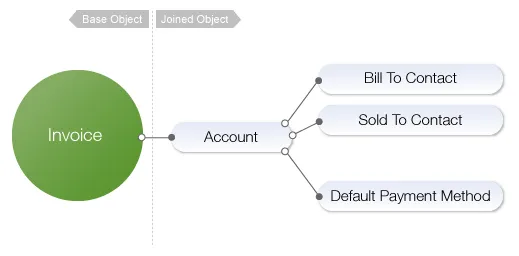
Use this data source to export invoice data, such as invoice amount, balance and dates. Each invoice represents one row in the export. This data source also includes associated data such as account, payment method, bill to and sold contacts on the account.
Using Invoice to generate reports
With the Invoice data source, you can generate reports such as:
A list of Committed Monthly Recurring Revenue (By Product, By Pricing Plan, By Account)
TCV By Account
History of Monthly Recurring Revenue By Account
Objects available in the data source
Base object description
Descriptions for the base Zuora object.
Zuora object
Description
Invoice
Invoices that reflect the subscription rate plan charges that have not been billed. The object includes the following fields:
Adjustment Amount
Amount
Amount Without Tax
Auto Pay
Balance
Comments
Created By ID
Created Date
Credit Balance Adjustment Amount
Credit Memo Amount
Currency
Due Date
E-Invoice Error Code
E-Invoice Error Message
E-Invoice File ID
E-Invoice Status
Entity
ID
Includes One Time
Includes Recurring
Includes Usage
Invoice Date
Invoice Group Number
Invoice Number
Last Email Sent Date
Payment Amount
Payment Link
Payment TermThe payment term that is used to calculate the due date on the invoices, which is generated from the corresponding subscription. The value of this field is the name of the payment term. If the payment term is not specified at the subscription level, the field value is null at the invoice level.
Posted By
Posted Date
Refund Amount
Retry Status
Reversed
Sequence Set ID
Sequential Invoice Number
Source
Source ID
Source Type
Status
Target Date
Tax Amount
Tax Exempt Amount
Template IDThis field has a value only if you have the Flexible Billing Attributes feature enabled.
Transferred To Accounting
Updated By ID
Updated Date
Related object descriptions
Descriptions for related Zuora objects are listed in alphabetical order.
Object
Description
Account
The account to whom the invoice belongs.
Bill To Contact
The contact of the entity/person to whom you bill for your product or service. It contains the bill-to contact data associated with the account.
Bill To Contact Snapshot
A copy of the bill to contact information used to generate invoices.
Billing Document PDF Generation
This represents the current PDF generation status of the document and contains the following fields:
Created By ID
Created Date
Error Category
Error Message
File ID
Generation Source
Generation Status
ID
Updated By ID
Updated Date
Alternatively, you can select the Select All “Billing Document PDF Generation” Fields checkbox to include all fields at once.
Entity
The entity that the data relates to. Part of the Multi-entity feature. Contains the following fields:
Address 1
Address 2
City
Country
Created By ID
Created Date
Display Name
Email
ID
Name
Postal Code
State
Updated By ID
Updated Date
Sold To Contact
The contact of the entity/person to whom your product or service is sold. It contains the sold-to contact data associated with the account.
Sold To Contact Snapshot
A copy of the sold to contact information used to generate invoices.
Invoice FX Data
Contains Home Currency and Reporting Currency information.
The default payment method of the customer account, to whom the invoice belongs.
Invoice Bill To Contact
The bill-to contact that is associated with the invoice. It’s not null in 2 scenarios:
Invoice is generated from the corresponding subscription and the bill-to contact is specified at the subscription level. The value is null at the invoice level if the bill-to contact is not specified at the subscription level.
It is a standalone invoice and the bill-to contact is specified at the invoice level. For more information, see Create a standalone invoice.
To specify a bill-to contact on the invoice or subscription level, you need to enable the Flexible Billing Attributes feature.
Keep in mind that the fields for Invoice Bill To Contact are the bill-to contact data on the invoice, while the fields for Bill To Contact are the bill-to contact data on the account.
Invoice Sold To Contact
The sold-to contact that is associated with the invoice.
Invoice Sold To Contact is not null in the following scenario:
It is a standalone invoice and the sold-to contact is specified at the invoice level. For more information, see Create a standalone invoice.
To specify a sold-to contact on the invoice, you’ll need to enable the Flexible Billing Attributes feature.
If the Invoice sold-to contact is not specified on the standalone invoice or the invoice is generated from a subscription or an order line item, Invoice Sold To Contact is always null.
Note that the invoice-level sold-to contact is null even if the sold-to contact is specified at the subscription level and the invoice is generated from the corresponding subscription. It is because the subscription-level sold-to contact is stored at the Invoice Item level. For more information, see Invoice Item Data Source.
Keep in mind that the fields for Invoice Sold To Contact are the sold-to contact data on the invoice, while the fields for Sold To Contact are the sold-to contact data on the account.
E-Invoice Profile
The e-invoicing profile associated with the customer account. All standard and custom fields on the EInvoiceProfile object are available for export.