

Skip to navigation

Unpin a card from the Dashboard

View as Markdown

Learn how to unpin a card from the Dashboard using the menu icon or directly from the card’s options.

To unpin a card from the Dashboard:

The card is now unpinned from the Dashboard.

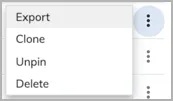
Alternative: You can also directly unpin a card in the Dashboard by clicking the menu icon in the card and selecting Unpin.
1

Navigate to Analytics > Explorer > Cards. You can determine whether a card is already pinned to the Dashboard by its value in the Pinned column. Only cards showing Yes in the Pinned column can be unpinned from the Dashboard.

2

Locate the card to unpin from the Dashboard.

3

Click the menu icon and then select Unpin.

analytics cards menu unpin