

Configure an Enrichment processor (Product or Account data)
Learn how to configure an Enrichment processor to enhance events with product or account data.
You can use this method for enrichment based on standard Zuora metadata such as product catalog, accounts, subscriptions, and charges.
Select and drag the Enrichment processor type on to the meter stream page. The enrichment settings page is displayed.
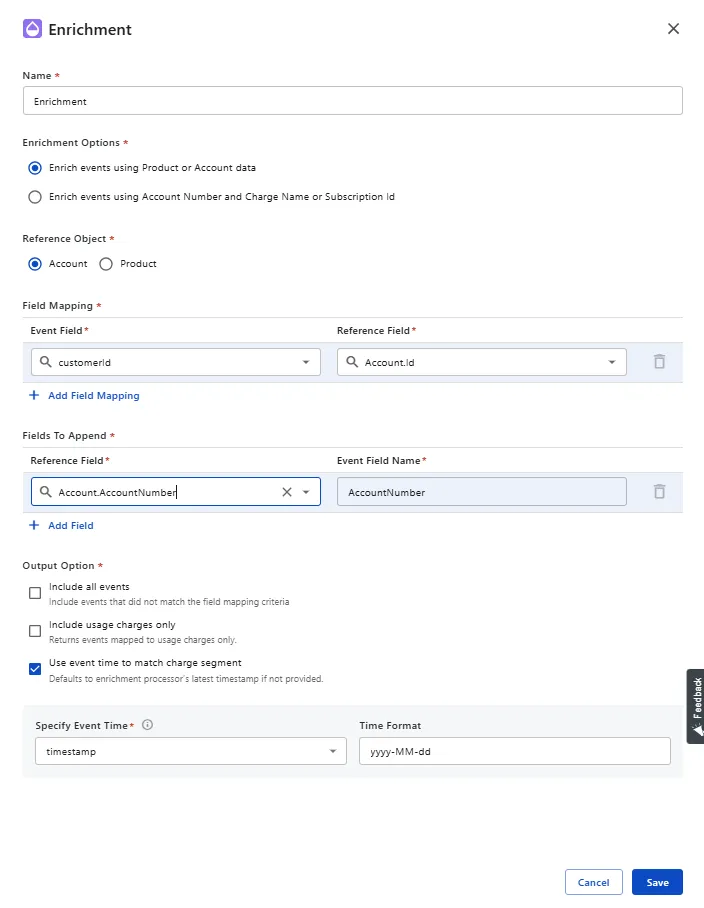
Under Reference Object, select either Account or Product as the source for enrichment.
The fields from the selected reference object are used to match and fetch additional data into the event.
Specify the Field Mapping.
Field mappings define the join logic, how event records should be matched to reference data.
- Event Field: The field from the event stream. Examples: accountNumber, productSKU.
- Reference Field: The corresponding field from the reference object to be matched.
This is equivalent to a SQL join ON event.accountNumber = account.accountNumber. You can add multiple field mappings to create composite joins, such as accountNumber and region.
Specify the Fields To Append.
Defines which fields from the reference data should be appended to the event.
- Reference Field: The Account or Product field that you want to fetch.
- Event Field Name: The name of the field in the enriched event.
Append accountType from Account object as enriched_account_type.
You can select RatePlanCharge.PricingAttributes as the Reference Field. In Event Field Name, enter the name of the event field that should contain the appended value. For example, enter PricingAttributes.
The appended value can be a JSON object. Use an Advanced Transformer to extract individual pricing attribute values before you configure the Rating processor.
Select an Output Option to specify the events that are returned after enrichment.
- Include all events: Allows events to pass through even if no match is found in the reference data.
- Include usage charges only: Filters results to include only usage charges. This is useful when enrichment is intended solely for usage-based billing scenarios.
- Use event time to match charge segment: Ensures a charge segment is selected based on the event’s timestamp, which is important when rate plan charges have multiple time-based segments. If you leave it unchecked, the system uses the latest timestamp while processing these records.
Charge Segment
If the Use event time to match charge segment checkbox is enabled and availableTime is chosen as, say November 2024, the system picks $1. If the checkbox is disabled, the system picks $2.