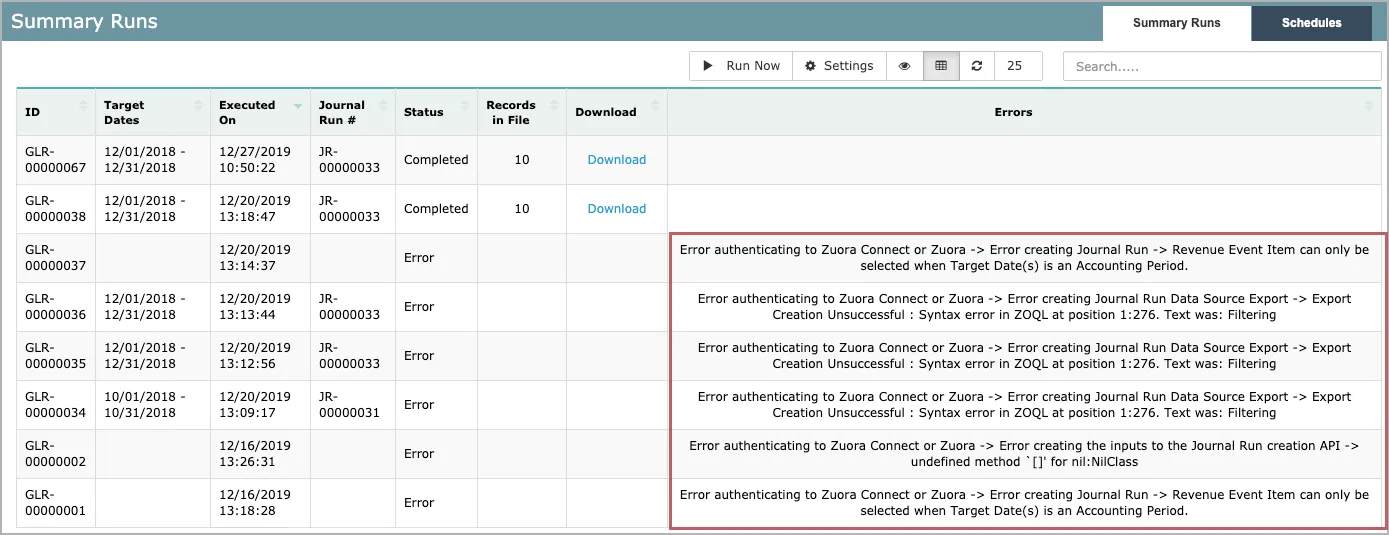
| Error authenticating to Zuora Connect or Zuora -> Error in file upload -> Error Transferring CSV to the SFTP endpoint -> The server did not respond during connection attempts. | SFTP issue | Check whether the SFTP server is available. |
| Error authenticating to Zuora Connect or Zuora -> Error in file upload -> Access Denied | SFTP issue | Ensure your credentials to the SFTP server are still valid. |
| Error authenticating to Zuora Connect or Zuora -> Error creating the inputs to the Journal Run creation API -> undefined method `[]’ for nil:NilClass | Configuration issue | |
| Error authenticating to Zuora Connect or Zuora -> Error creating Journal Run -> Revenue Event Item can only be selected when Target Date(s) is an Accounting Period. | Behavior as designed | Revenue Event Item can only be selected when Target Date(s) is an Accounting Period. |
| Error authenticating to Zuora Connect or Zuora -> undefined method `each’ for nil:NilClass | Configuration issue | |
| Error authenticating to Zuora Connect or Zuora -> Error in file upload -> Error Transferring CSV to the SFTP endpoint -> Net::SFTP::StatusException open .FILENAME.zip (2, “no such file”) | SFTP issue | Ensure the SFTP file directory is valid. |
| Error authenticating to Zuora Connect or Zuora -> Error creating Journal Run Data Source Export -> Export Creation Unsuccessful : Syntax error in ZOQL at position 1:478. Text was: | ZOQL issue | |
| Error authenticating to Zuora Connect or Zuora -> Error Marking Journal Entry as TransferredToAccounting -> Transferred to Accounting can no longer be changed after a Journal Entry has been cancelled. | Behavior as designed | |
| Error authenticating to Zuora Connect or Zuora -> Error in file upload -> Error Transferring CSV to the SFTP endpoint -> Net::SSH::ConnectionTimeout | SFTP issue. The connection to the SFTP server times out. | Ensure that you can connect to the SFTP server. |
| Error authenticating to Zuora Connect or Zuora -> Error querying out preexisting Journal Run -> Cannot find entity by key: ‘JR-00000041’. | Configuration issue | Ensure the journal run ID is valid. |
| Error authenticating to Zuora Connect or Zuora -> Error Mapping journal entry items to the endpoint’s format -> Liquid syntax error: Unexpected character \ in “JournalEntryItem.Type == ‘Debit‘“ | Liquid error | Ensure the Liquid expressions used in the file mappings are valid. |
| When clicking the Download link to get the files, the user got the error message: “AccessDeniedRequest has expired”. | Behavior as designed | Rerun the journal run by ID and download the exported file immediately after the rerun completes. |
| Error authenticating to Zuora Connect or Zuora -> Error while creating the api request -> Sending to endpoint was unsuccessful → INVALID_KEY_OR_REFInvalid subsidiary reference key. | Configuration issue | Ensure the Subsidiary field in the File Setting uses the NetSuite Subsidiary Internal Id. |
Error authenticating to Zuora Connect or Zuora -> Error while creating the api request -> Sending to endpoint was unsuccessful -> INVALID_KEY_OR_REF Invalid currency reference key. | The Currency field is not configured with a valid NetSuite currency internal ID. | Update the currency mapping in the file settings. Use Custom Logicto map each currency to its corresponding NetSuite currency internal ID. The GL Interface no longer supports plain-text currency values. If the mapped value is not a valid NetSuite currency internal ID, NetSuite returns the INVALID_KEY_OR_REF currency reference error. |